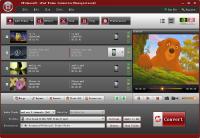
4Videosoft iPod Video Converter can convert all video like MPG, MPEG, MPEG2, MTS, M2TS, TS, VOB, MP4, M4V, RM, RMVB, WMV, ASF, etc to MP4, H.264/MPEG-4 AVC(.mp4), MOV format for your iPod, iPod touch 4, iPod nano and iPhone.
4Videosoft iPod Video Converter is a professional video to iPod converter for you to convert all videos like MPG, MPEG, MPEG2, MTS, M2TS, TS, VOB, MP4, M4V, RM, RMVB, WMV, ASF, etc to MP4, H.264/MPEG-4 AVC(.mp4), MOV format for your iPod, iPod touch 4, iPod nano and iPhone. So, it also acts as iPod touch video converter, iPod nano Video Converter. This wonderful converter also supports converting all the popular audio formats to iPod MP3, AAC, WAV, M4A, AIFF.
4Videosoft iPod Video Converter can enrich the contents of your iPod in the way of editing your video sources. It can get any clips from source video, crop video play region, join several files into one file, add watermark if needed, capture favorite pictures when preview. Moreover, it is newly updated to support 6X faster conversion speed with NVIDIAŽ CUDA?.
Key functions:
1.Convert Videos to iPod Compatible Formats
4Videosoft iPod Video Converter can convert all the regular formats to MP4, H.264/MPEG-4 AVC(.mp4), MOV video and MP3, AAC, WAV, M4A, AIFF audio for iPod.
4Videosoft iPod Video Converter can also extract audio from video and convert them to MP3, AAC, WAV audio format.
2.Edit Video Effect
4Videosoft iPod Video Converter allows you to get any clips from your video sources. You can get it by setting the exact time or just dragging the slider bar.
4Videosoft iPod Video Converter allows you to crop video and adjust the output aspect ratio to get the perfect playing effect.
Merge your selected video sources into one file after conversion for you to enjoy successively.
Watermark your video by inserting image or inputting text then adjust its position, transparence or other features.
3.Set Output Settings
Input you want Video Resolution parameter in the form of Width(pixels)*Height(pixels), all those parameters can be saved as user defined profile for your future use.
All the parameters of profile can be provided for you to choose the exact settings for your players. Whats new in version 5.1.8: 1.It supports all the iPod versions: iPod touch 4, iPod nano, iPod classic, iPod shuffle.2.Now 6X faster conversion speed with NVIDIA CUDA. Requirements: 800MHz Intel or AMD CPU, or above; 512MB RAM or more Operating system: Windows All Release notes: Major Update
ImTOO 3GP Video Converter v3.1 is a professional mobile phone tool. It supports converting
various popular formats including RM, RA, 3GP, 3G2, WAV, MP3, AAC, WMA, MPG, M4A, AVI,
MP4, MOV, WMV, MPEG, CUE, APE, CDA and AVI to 3GP,RA, RM,AAC, M4A,XviD.
Price: $25.46, Rating: 8.2, Downloads: 107 Download
Total Audio Converter is the best tool to convert mp3, wav, flac, ogg, ape and much more. Look closer at it: TAC supports all audio formats, has built-in CD ripper and audio player, can be handled via command line and is still very user-friendly.
Price: $17.91, Rating: 6, Downloads: 100 Download
Reezaa WMA Converter is an easy-to-use all to WMA converter Converts all formats Video and Audio to WMA,WAV,MP3,OGG,FLAC,AMR,AC3,AAC.It supports MP3, AVI, WMV, MOV, 3GP, MP4, FLV, RM, RMVB, VOB, DAT, MPEG, WAV, WMA, ASF, OGG, RA etc.
Price: $29.95, Rating: 0, Downloads: 93 Download
Jesterware DVD Audio Ripper is a powerful DVD Audio ripping program, which will take your DVD and convert the audio track into an audio formats of your choice.
Price: $24.99, Rating: 6, Downloads: 69 Download
User Rating
Rating:2.2 out of
5 Based on13 ratings.
13 user reviews.

 4Videosoft iPod Video Converter 5.1.8 details